The Adobe Firefly AI Assistant, which will soon be available in public beta, will take a user's request and then organize multi-step workflows across multiple Creative Cloud applications. Here are the details.
AI-Powered Workflows Across Creative Cloud Applications
Today, we are announcing the Adobe Firefly AI Assistant. This intelligent agent will soon build on the existing AI assistants across several Creative Cloud applications and will organize multi-step actions from a single, unified interface, maintaining context between sessions.
In practice, this means that users will not need to know the details of platforms like Photoshop, Premiere, Express, Lightroom, and Illustrator. Instead, they will direct the Firefly AI Assistant and obtain results by organizing actions between these applications.
The Firefly AI Assistant, which will be available in public beta in the coming weeks, will come with a library of pre-built Creative Skills (for example, retouching portrait photos with consistent presets or creating content across social channels) and will also allow users to create their own skills to streamline their workflows.
In fact, Adobe states that the Firefly AI Assistant will provide "more consistent, personalized results" over time by learning the user's preferences, aesthetic choices, and preferred tools and workflows.
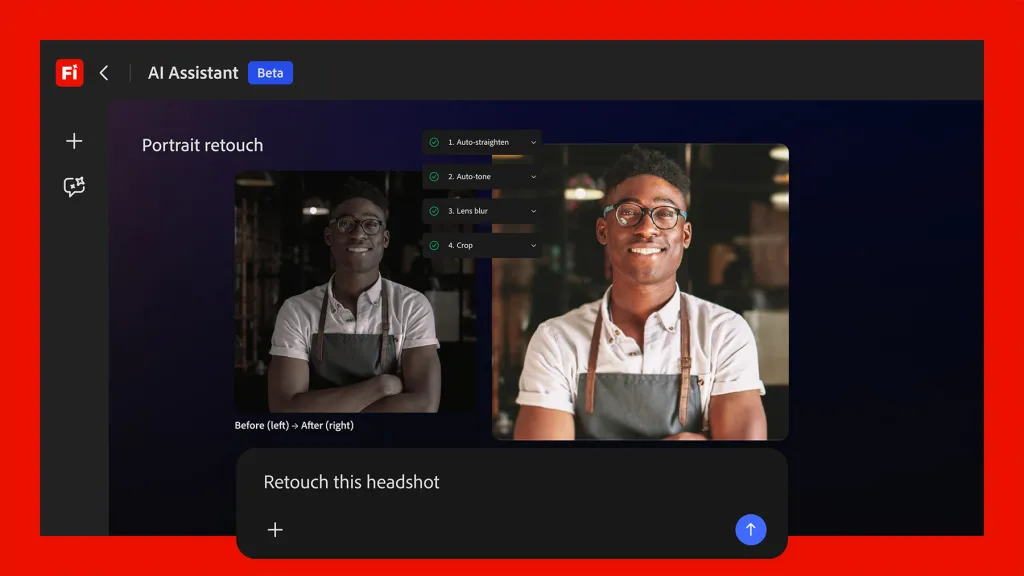
Importantly, the Firefly AI Assistant will offer suggestions based on the user's request and will even ask contextual questions, allowing users to "intervene, guide, or adjust the results at any point."
One ambitious aspect of the Firefly AI Assistant is its ability to understand context. Adobe says this about the feature:
For example, if you are editing a product photo set in a forest, the assistant could offer a simple slider to enhance or reduce the surrounding trees and greenery, allowing you to easily adjust the scene without complex edits.
Adobe also adds that the shared workflow platform Frame.io will be part of the experience, enabling users to package and organize materials for a presentation using the assistant, share them with collaborators, gather feedback, and even automatically implement desired changes.
Finally, the company worked with Anthropic to ensure the Firefly AI Assistant is compatible with Claude, allowing "creators to access the best of Adobe on the surfaces they work on every day," and additional third-party integrations are also on the way.
Currently, there is no set release date for the Firefly AI Assistant. The company states that the platform will be "available in public beta in the coming weeks" and that more information and demos are planned for Adobe Summit, which will take place in Las Vegas from April 19-22.
New Video and Image Editing Capabilities Available Today
Today's announcement also includes more practical news that creators can benefit from immediately.
First, the Firefly Video Editor is adding new capabilities:
- Audio Enhancements: The award-winning Enhance Speech feature, which automatically cleans up dialogue in Premiere and Adobe Podcast, is now available in the Firefly Video Editor and comes with additional audio enhancements. Creators can reduce noise and echo and achieve smooth audio with just a few clicks by balancing speech, music, and ambient sound.
- Color Adjustments: Creators can fine-tune exposure, contrast, saturation, temperature, and other key visual elements within the Firefly Video Editor. User-friendly sliders allow them to control the intensity of each adjustment, while one-click appearance options make it easy to get started.
- Adobe Stock Integration: Creators can access over 800 million licensed assets, including videos, images, sounds, and sound effects, directly within the Firefly Video Editor workflow.
Adobe Firefly is also adding Kling 3.0 and Kling 3.0 Omni to the list of over 30 third-party video models; this list also includes Google’s Nano Banana 2 and Veo 3.1, Runway Gen-4.5, Luma AI’s Ray3.14, Black Forest Labs’ FLUX.2 [pro], ElevenLabs’ Multilingual v2, Topaz Lab’s Topaz Astra, and Adobe’s own "commercially safe" Firefly models.
Finally, Firefly’s image editing toolkit is also gaining new capabilities:
- Precision Flow: Creators can explore and fine-tune images faster by generating a wide range of results from a single prompt. A user-friendly slider allows creators to scan variations—from subtle changes to dramatic transformations—and select the version that fits best without starting over.
- AI Markup: Creators can have direct control over where and how edits are applied. Using a brush, rectangular tool, or reference images, they can draw directly on an image to place objects, sketch new elements, or fine-tune lighting.
What do you think about today’s news? Let us know in the comments.
Products Worth Browsing on Amazon
- David Pogue – 'Apple: The First 50 Years'
- MacBook Neo
- Logitech MX Master 4
- AirPods Pro 3
- AirTag (2nd Generation) – 4 Pack
- Apple Watch Series 11
- Wireless CarPlay Adapter






























Comments
(2 Comments)